ApexSaaS: Production-Ready SaaS SDK
A comprehensive Python SDK that unifies authentication, payments, and email services into a single, database-agnostic, framework-agnostic solution for modern SaaS applications.

Project Overview
Building a SaaS application requires implementing three critical components: user authentication, payment processing, and email notifications. Each of these typically requires weeks of development, integration with third-party services, and extensive testing. ApexSaaS solves this by providing a unified, production-ready Python SDK that handles all three components with a clean, intuitive API. The package is completely database-agnostic and framework-agnostic, allowing developers to integrate it into any Python application—whether using FastAPI, Flask, Django, or custom frameworks—without being locked into a specific architecture.
System Architecture
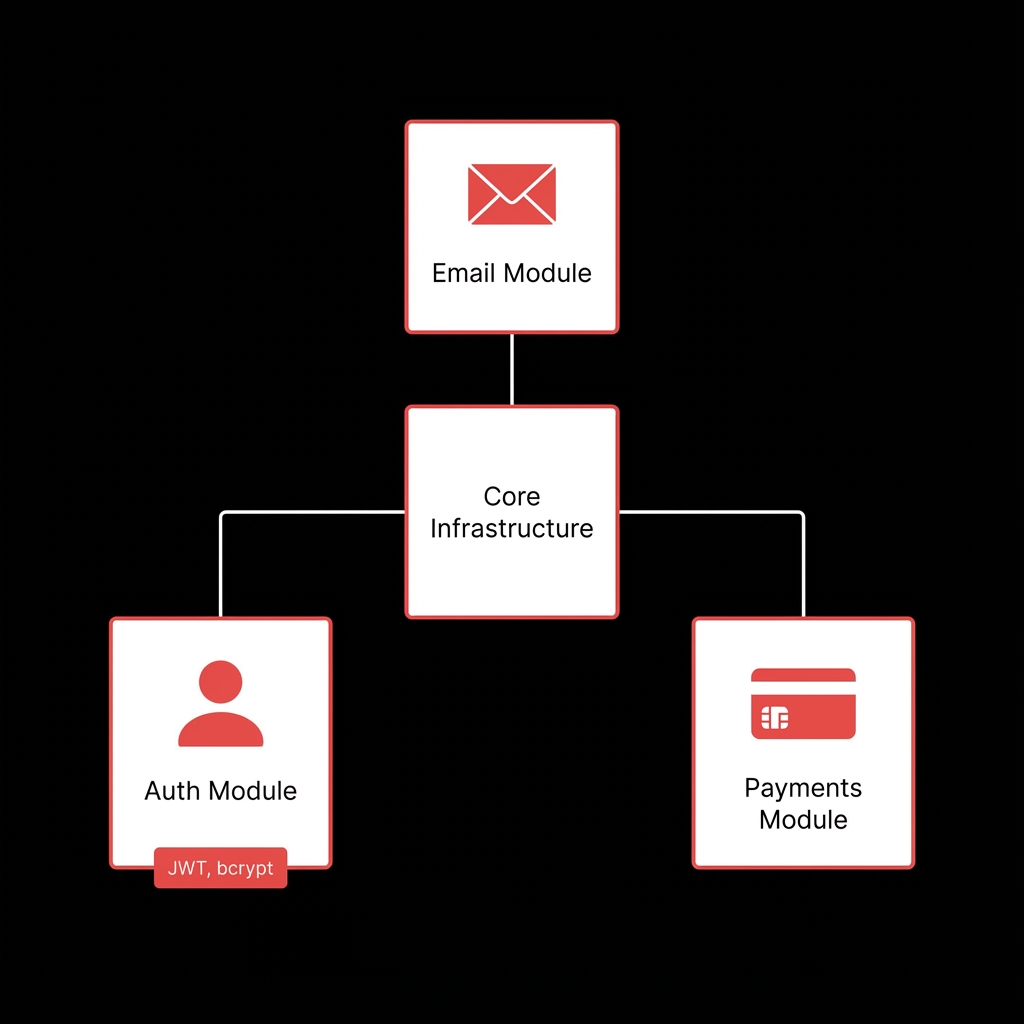
ApexSaaS follows a modular architecture with three independent core modules (Auth, Payments, Email) that share common infrastructure. The Auth module handles user authentication and JWT token management. The Payments module integrates with PayPal's REST API for payment processing. The Email module uses SendGrid's API for transactional emails. All modules share core utilities for security (password hashing, JWT), configuration management, and error handling, while remaining completely decoupled from any database or framework.
Auth Module
Handles user signup, login, logout, password reset, email verification, and JWT token creation/validation with bcrypt password hashing
Payments Module
Integrates with PayPal API for creating orders, capturing payments, managing subscription plans, processing refunds
Email Module
SendGrid integration for sending verification emails, password reset emails, welcome emails, payment confirmations
Core Infrastructure
Shared utilities for JWT token management, password hashing (bcrypt), configuration management, error handling
Exception System
Custom exception classes (ApexError, ApexAuthError, ApexPaymentError, ApexEmailError) for proper error handling
Implementation Details
Code Example
from apexsaas.auth import signup, login, verify_token
from apexsaas.payments import create_order, capture_order
from apexsaas.email import send_email, send_welcome_email

# User Signup with automatic email verification
result = signup(
    email="user@example.com",
    password="SecurePass123!",
    name="John Doe",
    sendgrid_api_key="SG.your_sendgrid_api_key",
    from_email="noreply@yourdomain.com",
    jwt_secret="your-secret-key"
)

# Store user data in your database (any database you prefer)
user_data = result['user']
access_token = result['access_token']
refresh_token = result['refresh_token']

# Create a PayPal order
order = create_order(
    amount="99.99",
    currency="USD",
    client_id="your_paypal_client_id",
    client_secret="your_paypal_client_secret",
    return_url="https://yourdomain.com/success",
    cancel_url="https://yourdomain.com/cancel",
    sandbox=True
)

# Send custom email
send_email(
    to_email="user@example.com",
    subject="Welcome!",
    html_content="<h1>Your custom HTML email</h1>",
    sendgrid_api_key="SG.your_key",
    from_email="noreply@yourdomain.com"
)
Agent Memory
ApexSaaS doesn't store any data itself—it returns user objects and tokens that you store in your preferred database. This gives you complete control over your data model and makes the package work with any storage solution.
Workflow
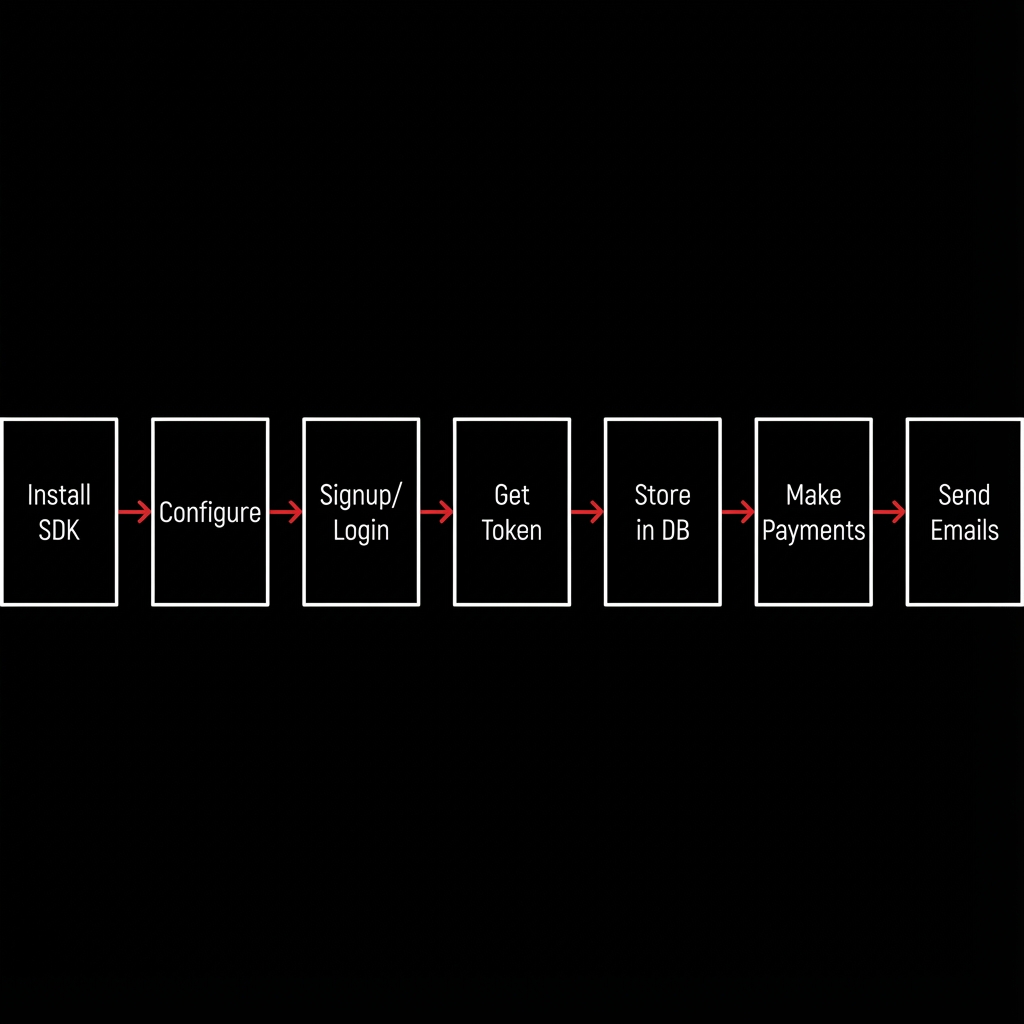
Installation: Install the package via pip (pip install apexsaas).
Configuration: Set up SendGrid API key, PayPal credentials, and JWT secret.
User Registration: Call signup() function, receive user data and tokens, store them in your database.
Authentication: Use login() to authenticate users, verify_token() for protected routes.
Payment Processing: Create orders with create_order(), redirect users to PayPal, capture payments.
Email Notifications: Send transactional emails automatically or manually using send_email().
Integration: The package works with any Python framework—simply import and use the functions.
Results & Impact
"ApexSaaS reduced our development time by 60%. We went from building authentication, payments, and email from scratch to having a production-ready solution in under a day. The database-agnostic design meant we could use it with our existing PostgreSQL setup without any modifications."
Development Speed
Reduced time-to-market by 60% with pre-built authentication, payments, and email modules
Framework Flexibility
Works seamlessly with FastAPI, Flask, Django, and any Python framework
Production Ready
Battle-tested code with comprehensive error handling and security best practices
Integration Time
From installation to working authentication, payments, and emails in under 30 minutes
About the Author
Praveen Jogi
AI Context Engineer
Apex Neural
Building real-world AI with LLMs, RAG pipelines, and clean backends. Works with vector databases and intelligent agents for context-aware applications. Designs modular, scalable systems with secure implementation and reliable cloud deployment.
Ready to Build Your AI Solution?
Get a free consultation and see how we can help transform your business.