Multi-Environment CI/CD Pipeline for AI-First Enterprise Application
How we architected and implemented a production-grade CI/CD pipeline supporting development, staging, and production environments for our agentic AI platform, enabling automated testing, Docker containerization, infrastructure provisioning, and zero-downtime deployments with complete environment isolation.


Project Overview
Our enterprise AI platform powered by multiple agentic AI systems required a sophisticated deployment strategy to support rapid iteration while maintaining production stability. The platform serves Fortune 500 clients with strict SLA requirements (99.9% uptime), processes 50K+ AI agent requests daily, and required frequent updates to both ML models and application logic. Manual deployments were taking 2+ hours, prone to human error, and lacked proper testing in staging environments. We designed and implemented a comprehensive multi-environment CI/CD pipeline using GitLab CI/CD, Docker, AWS services (EC2, RDS, S3, Lambda), and Infrastructure as Code (Terraform). The pipeline provides automated testing (unit, integration, E2E), security scanning, Docker containerization, environment-specific configuration management, automated database migrations, blue-green deployments for zero-downtime, and instant rollback capabilities.
System Architecture
The CI/CD pipeline follows a branch-based workflow integrated with GitLab CI/CD. Code commits trigger automated builds that run tests, security scans, and quality checks. The pipeline consists of five stages: Build (Docker image creation with multi-stage builds), Test (unit, integration, E2E, security scanning), Deploy-Dev (automatic deployment to development environment), Deploy-Staging (manual approval required, full testing suite), and Deploy-Production (manual approval with blue-green strategy). Each environment is completely isolated with separate AWS accounts, VPCs, databases, and S3 buckets. Infrastructure is managed through Terraform with separate state files per environment.
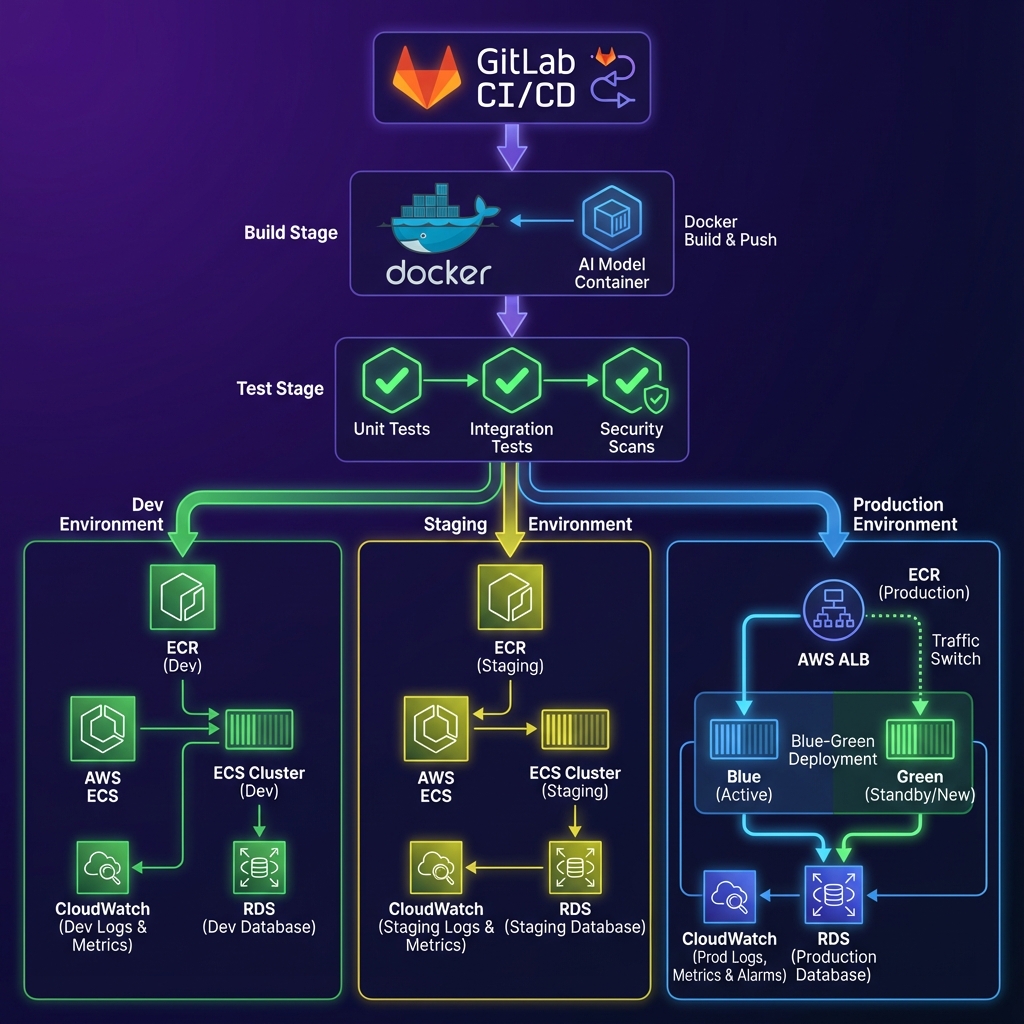
GitLab CI/CD
Pipeline orchestration with branch-based workflows, manual approval gates, and deployment tracking
Docker Multi-Stage Builds
Optimized containerization with separate dev and production configurations, reducing image size by 60%
AWS ECR
Container registry with automated vulnerability scanning, image versioning, and lifecycle policies
Terraform Modules
Infrastructure as Code for EC2, RDS, S3, VPC, security groups, and load balancers with state management
AWS Application Load Balancer
Traffic routing for blue-green deployments with health checks and gradual traffic shifting
CloudWatch & X-Ray
Comprehensive monitoring, logging, distributed tracing, and alerting for deployment health tracking
Implementation Details
Code Example
# .gitlab-ci.yml - Multi-Environment CI/CD Pipeline

stages:
  - build
  - test
  - deploy-dev
  - deploy-staging
  - deploy-prod

build:
  stage: build
  script:
    - docker build --target production -t $ECR_REPO:$CI_COMMIT_SHA .
    - docker tag $ECR_REPO:$CI_COMMIT_SHA $ECR_REPO:latest
    - aws ecr get-login-password | docker login --username AWS --password-stdin $ECR_REPO
    - docker push $ECR_REPO:$CI_COMMIT_SHA

test:unit:
  stage: test
  script:
    - docker run $ECR_REPO:$CI_COMMIT_SHA pytest tests/unit --cov

test:security:
  stage: test
  script:
    - trivy image --severity HIGH,CRITICAL $ECR_REPO:$CI_COMMIT_SHA

deploy:production:
  stage: deploy-prod
  when: manual
  script:
    - terraform apply -var="image_tag=$CI_COMMIT_SHA" -auto-approve
    - ./scripts/blue-green-deploy.sh $CI_COMMIT_SHA
  environment:
    name: production
Agent Memory
Our custom health check endpoint validates database connectivity, Redis availability, and AI model loading status before marking deployment successful. This prevented multiple incidents where the app was 'running' but unable to process AI requests.
Workflow
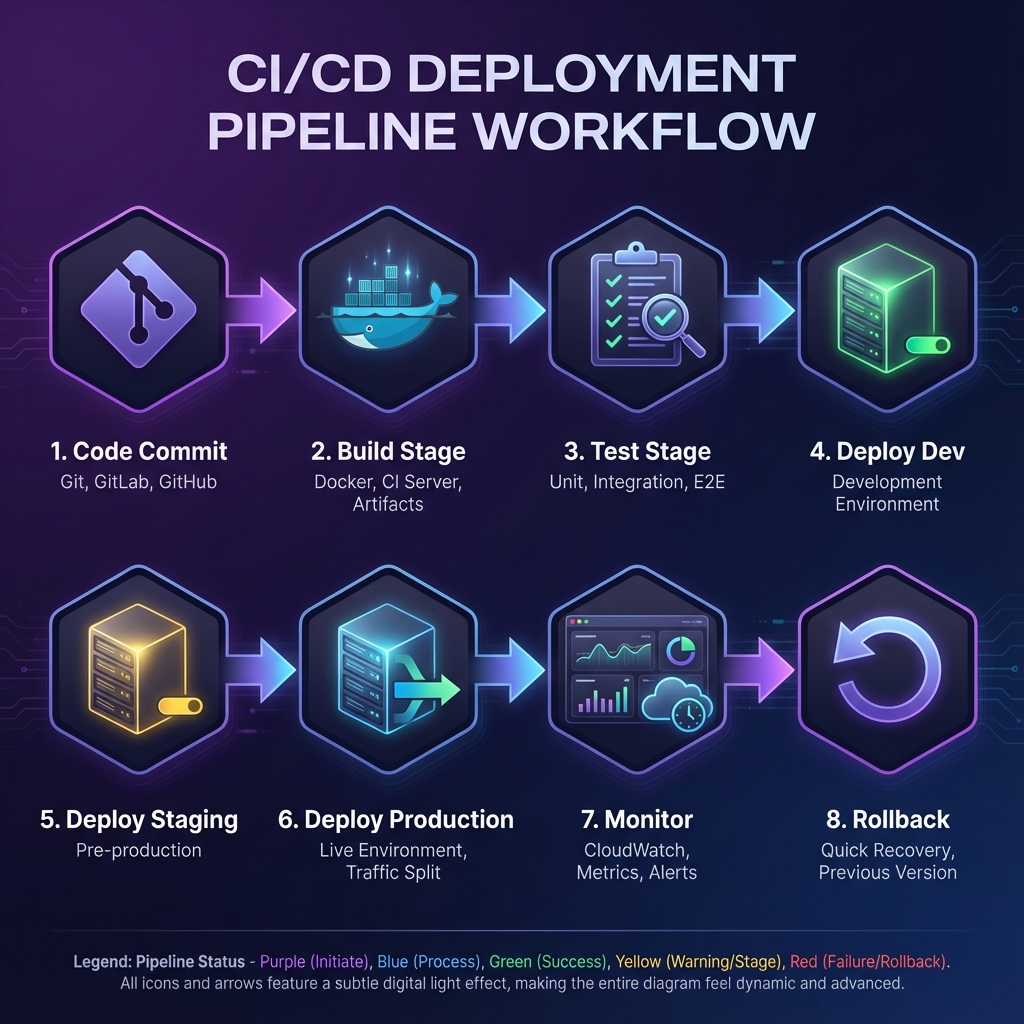
Code Commit: Developer pushes code to feature branch, triggering pipeline execution.
Build Stage: Docker image is built using multi-stage builds, tagged with commit SHA, and pushed to AWS ECR.
Test Stage: Parallel execution of unit tests, integration tests, E2E tests, and security scanning.
Deploy to Dev: Automatic deployment to development environment if all tests pass.
Deploy to Staging: Manual approval required with complete test suite including database migrations.
Deploy to Production: Manual approval with blue-green deployment strategy for zero-downtime updates.
Post-Deployment: CloudWatch monitors application health, Slack notifications sent to team.
Rollback (if needed): One-click rollback reverts to previous stable version within 30 seconds.
Results & Impact
"The CI/CD pipeline completely changed how we ship features. We went from dreading deployments to deploying multiple times a day with complete confidence. The automated testing and zero-downtime deployments mean we can innovate fast without breaking production."
Deployment Velocity
15+ daily deployments vs 2 weekly deployments previously
Time to Production
8 minutes vs 2 hours for complete deployment cycle
System Uptime
99.9% uptime achieved with zero-downtime blue-green deployments
Incident Reduction
80% fewer deployment-related production incidents
Team Productivity
Developers spend 70% less time on deployment tasks
About the Author
Ayush
AI Systems Architect
Apex Neural
Ayush is a Senior AI Systems Architect with 12+ years of experience building AI-first and SaaS platforms. He specializes in LLM-driven products, autonomous AI agents, and scalable enterprise systems using agentic design patterns like planning, reflection, tool use, and memory.
Ready to Build Your AI Solution?
Get a free consultation and see how we can help transform your business.